

Instagram Story Drafts — Your Tool for Strategic Content Planning
Instagram Story Drafts have completely transformed how creators, brands, and businesses manage their content. Long gone are the days when you had to capture, edit, and publish everything instantly. With drafts, you can record your stories calmly, refine them, organize them, and publish them exactly when you want — without rushing, without panic, and without breaking your content flow.
Whether you run a blog, manage brand collaborations, handle a business account, or simply prefer creating polished stories, Instagram Story Drafts are a tool you cannot ignore. They streamline organization, support better planning, and help you maintain a professional look across all your stories.
But to truly make the most of this feature, you need to understand how drafts work, how long they last, how to save them properly, and how to avoid losing your hard work. This complete guide covers everything — from basic usage to advanced planning strategies.
What Are Instagram Story Drafts and Why Do They Matter?
Instagram Story Drafts allow you to save your work in progress so you can return to it later. Instead of posting on the fly, you can:
- Record a story any time you want
- Save it as a draft with one tap
- Re-edit it when you’re ready
- Publish it at the perfect moment
This feature is especially powerful now that Instagram is becoming increasingly convenient and necessary for businesses. If your business account is optimized, story drafts help you maintain consistent quality, improve timing, and achieve better engagement.
For creators, influencers, SMM specialists, and even casual users, drafts allow you to stay organized, reduce mistakes, and maintain a polished aesthetic.

How Instagram Saves Story Drafts (And Why You Can Lose Them)
It is important to know Instagram saves story drafts on your phone — not on the cloud.
That means:
- If you uninstall the Instagram app — drafts are gone
- If you clear app data — drafts are gone
- If your phone storage is too low — drafts may disappear
- If the app auto-updates — sometimes drafts get wiped
This is crucial for anyone preparing content for projects, campaigns, or collaborations.
If you are working on scheduled content, do not reinstall or update Instagram before posting, unless your drafts are already published or backed up.
How to Create Instagram Story Drafts
Creating a story draft is extremely simple.
On Android
- Record or upload your story
- Tap the ← (Back) button
- Select Save Draft
Your draft will then be stored in the Drafts section of your story creation screen.
On iPhone
The navigation is slightly different:
Stories → Gallery → Drafts
iPhone’s interface makes draft access easy and intuitive, especially if you work with multiple story versions.

How to Edit Instagram Story Drafts Efficiently
Editing drafts is almost identical to editing regular stories. You can add:
- Music
- Text overlays
- Location tags
- Mentions
- Hashtags
- Stickers
- GIFs
- Filters
- Drawings
This allows you to refine your content at your own pace. Instead of rushing a story, you can perfect the design, check spelling, adjust colors, and ensure your branding stays consistent.
How Long Instagram Story Drafts Last
Instagram automatically deletes drafts after 7 days from the last edit.
This countdown restarts every time you:
- Open the draft
- Add something
- Save it again
Why Drafts Sometimes Disappear Earlier
Drafts may vanish due to:
- Low phone storage
- Cache cleaning
- App glitches
- Software updates
- Switching devices
Since drafts are not synced between devices, they live and die on your current phone only.
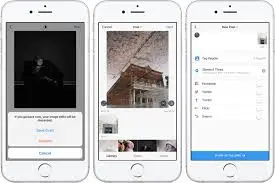
Keeping Your Drafts Organized
You can delete drafts individually or remove them all at once if your storage is full or your content strategy changes. A clean drafts folder helps you:
- Manage content plans
- Avoid confusion
- Prevent duplicate stories
- Keep your workflow productive
For brands and marketers, staying organized directly impacts how efficiently content is delivered.
Why Story Drafts Are Essential for Content Planning
Instagram Story Drafts are incredibly useful for planning your content calendar. Whether you’re preparing daily updates, branding content, or long-term campaigns, drafts help keep everything aligned.
Preparing Stories in Advance
You can prepare:
- Branded designs
- Query stickers
- Polls
- Swipe-up CTAs (if available)
- Multi-frame narrative stories
- Product announcements
- Behind-the-scenes content
- Tutorials and guides
- Promotional series
Everything stays saved until the perfect moment.
This is ideal for:
- Agencies managing multiple clients
- Brands preparing launch campaigns
- Creators planning weekly content
- Businesses coordinating announcements
- Influencers who need polished visuals
Team Collaboration Using Story Drafts
Story drafts significantly improve teamwork. SMM specialists and clients can:
- Finalize designs
- Review ideas
- Approve content
- Reduce revisions
- Share exact story layouts
Instead of sending screenshots back and forth, the ready story draft can be shown directly for approvals.
Compatibility With Instagram Planning Tools
Story drafts work smoothly with Meta tools like:
- Meta Business Suite
- Creator Studio
This combination connects:
- Mobile preparation
- Desktop analytics
- Publishing workflows
It ensures better timing, improved accuracy, and professional-level content management.

Advanced Tips to Get More Out of Instagram Story Drafts
Once you understand the basics, you can elevate your strategy with advanced techniques.
Batch Create Your Stories
Set aside one session per week:
- Record videos
- Design graphics
- Add text, hashtags, mentions
- Prepare daily stories in advance
Batching saves time and helps maintain creative consistency. Instead of creating stories daily, you prepare everything at once.
Maintain Brand Consistency
Use drafts like templates.
You can create a base design with:
- Brand colors
- Fonts
- Logo placement
- Signature layout
- Standard sticker formatting
Whenever you need a new story:
- Open the template draft
- Add new content
- Save again
- Publish
Just remember to re-save the blank template each time so it doesn’t expire.
Test Your Story Flow Before Publishing
Multi-part stories often need visual and narrative continuity. Drafts help you:
- Create all frames at once
- View them as a complete sequence
- Check readability
- Ensure each tap feels smooth
- Adjust pacing
- Fix awkward transitions
This is essential for:
- Tutorials
- Announcements
- Guides
- Q&A series
- Brand storytelling
- Promotions and ads
Understanding the Limitations of Instagram Story Drafts
Drafts are incredibly useful, but they have limitations every creator must understand.
Drafts Are Not Auto-Schedulers
Drafts do not publish automatically.
You must:
- Open the draft
- Tap Share manually
If you need automated posting, you require external scheduling tools.
No Cross-Device Syncing
You cannot:
- Start a draft on iPhone
- Continue it on Android
- Move it to another phone
Drafts are stored locally.
If you change phones, they stay behind.
Interactive Stickers Only Activate Upon Publishing
Polls, quizzes, sliders, and question boxes stay inactive in drafts.
They only start working when the story goes live.
Final Thoughts Why Instagram Story Drafts Are a Must-Have Tool
Whether you’re managing a personal page or a full-scale brand account, Instagram Story Drafts provide incredible control over creativity and timing. They help you:
- Save time
- Plan ahead
- Improve quality
- Maintain consistency
- Coordinate with teams
- Avoid last-minute stress
- Create professional, polished stories
Drafts are your reliable assistant — keeping your work organized and protected (as long as you keep the app installed and save regularly).
With smart planning, batching, brand templates, and a clear understanding of how drafts work, you can completely transform how you create Instagram Stories.
For more
For more exclusive influencer stories, visit influencergonewild