Which HDMI Cables to Buy? Choose the Most Suitable for You
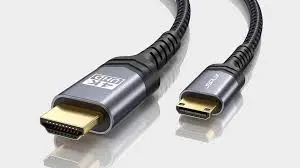
Choosing the right HDMI cable may seem simple, but it can significantly affect the way your TV, gaming console, projector, or home theater performs. Many people think all HDMI cables are identical, but the truth is that each type of HDMI cable is designed with specific capabilities, speed support, and performance levels. If you are planning to pick a cable from the shelf or order a bulk HDMI cable online, understanding these differences will help you avoid confusion and make a smarter, cost-effective choice.
Not every HDMI cable is suitable for every device. Some cables support only basic HD resolutions, while others can handle advanced technologies like 4K HDR, high refresh rates, and even 8K video. The build quality, cable length, and version compatibility also play an important role in how well your devices perform. With the right information, you can choose a cable that fits your exact needs instead of overpaying for unnecessary features or ending up with a cable that cannot deliver the performance you expect.
In this guide, we break down types of HDMI cables, important features to consider, ideal cable types for different uses, and common mistakes you must avoid. By the end, you’ll know exactly which HDMI cable is right for you—whether it’s for everyday TV watching, gaming, office work, or a dedicated home theater setup.
Understanding Why HDMI Cable Choice Matters
HDMI cables carry both audio and video signals from one device to another. A good-quality cable ensures stable transmission, sharp visuals, and clear audio. A low-quality or incompatible cable can cause:
- Screen flickering
- Loss of signal
- Poor color accuracy
- Lower refresh rates
- Audio dropouts
- Input lag during gaming
When you choose the right cable, your entire entertainment or work setup becomes smoother, faster, and more reliable. The goal is not to buy the most expensive cable, but the correct one.
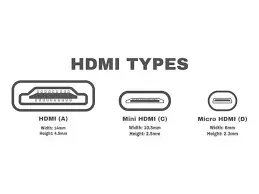
Types of HDMI Cables
HDMI cables are classified based on speed, bandwidth, and the resolution they support. Understanding the types helps you pick a cable that matches your device’s requirements.
Standard HDMI Cable
A Standard HDMI Cable supports:
- 720p resolution
- 1080i resolution
- Basic HD viewing
These cables work best with:
- Older HDTVs
- Early-generation streaming devices
- Basic cable or satellite receivers
If your devices are older or you do not need full HD or 4K resolutions, this cable is enough. It is also one of the most affordable HDMI cable types.
High-Speed HDMI Cable
A High-Speed HDMI Cable is more powerful and supports:
- 1080p resolution
- 4K at 30Hz
- 3D video
- Deep Color
Ideal for:
- Modern HDTVs
- Blu-ray players
- Streaming devices like Roku, Chromecast, and Fire TV
- Basic gaming setups
Most households use High-Speed HDMI cables because they offer strong compatibility with modern displays.
Premium High-Speed HDMI Cable
A Premium High-Speed HDMI Cable is designed for higher performance and supports:
- 4K at 60Hz
- HDR (High Dynamic Range)
- Wider color spectrum
- Better refresh rates
This cable is excellent for:
- Advanced home theater setups
- High-end TVs
- 4K HDR content
- Gaming consoles like PS4 Pro, PS5 (basic level), Xbox One X
Premium HDMI cables offer a noticeable improvement in picture clarity, brightness, and color depth.
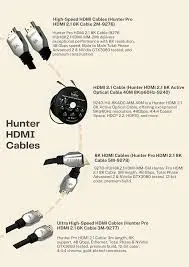
Ultra High-Speed HDMI Cable
This is the most advanced type—future-proof and built for maximum performance. An Ultra High-Speed HDMI Cable supports:
- 8K video
- 4K at 120Hz
- 10K resolution
- HDMI 2.1 features
- Variable Refresh Rate (VRR)
- Auto Low Latency Mode (ALLM)
- Enhanced Audio Return Channel (eARC)
Best for:
- PS5 and Xbox Series X gaming
- High-end 4K and 8K TVs
- Home theaters with soundbars or AV receivers
- Next-generation displays
If you want the best possible performance, especially for gaming or advanced home theater setups, this is the cable to choose.
Key Features to Consider Before Buying an HDMI Cable
Choosing the right HDMI cable requires a bit more thought than just picking the cheapest one. Here are the main factors to consider:
Cable Length
Length affects signal strength. As cables get longer, they become more prone to signal loss.
- Under 10 feet: Standard cables work fine
- 10–25 feet: Choose a High-Speed or Premium cable
- Over 25 feet: Use Active HDMI cables (with built-in signal amplifiers)
If you need extremely long runs, such as for home theaters or wall installations, consider:
- Optical HDMI cables
- Active HDMI cables
- HDMI-over-Ethernet extenders
These prevent degradation and keep picture quality sharp.
Build Quality
Better build quality ensures durability and long life.
Look for:
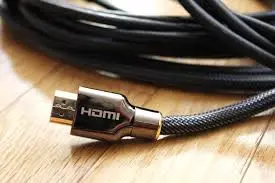
- Gold-plated connectors – resist corrosion
- Braided jackets – prevent cuts and bends
- Thick insulation – reduces interference
- Strong shielding – maintains stable signals
Good materials help reduce noise, keep connections secure, and protect the cable.
Version Compatibility
HDMI versions matter. They determine the cable’s bandwidth, which affects resolution and refresh rate.
- HDMI 1.4 – supports 1080p and 4K at 30Hz
- HDMI 2.0 – supports 4K at 60Hz
- HDMI 2.1 – supports 4K at 120Hz and 8K
If you have 4K or 8K devices, make sure you choose a cable that explicitly states HDMI 2.0 or HDMI 2.1 compatibility.
Certifications
A certified HDMI cable guarantees that it has passed performance tests.
Common certifications include:
- Premium HDMI Certification
- Ultra High-Speed Certification
These ensure the cable meets exact bandwidth standards and will work correctly with modern devices.
Best HDMI Cables for Different Uses
Not every setup needs the most advanced cable. Here’s how to choose correctly based on your device and purpose:
For TVs and Streaming Devices
Use a High-Speed HDMI Cable.
Perfect for:
- Smart TVs
- Roku
- Fire TV Stick
- Apple TV
- Basic HD or 4K streaming
This cable handles movies, shows, and everyday use without issues.
For Gaming Consoles
If you are using:
- PlayStation 5
- Xbox Series X
- A powerful gaming PC
You need a 4K HDMI cable, specifically:
- Premium High-Speed HDMI (for 4K 60Hz)
- Ultra High-Speed HDMI (for 4K 120Hz or 8K)
A better cable improves:
- Input response
- Frame rates
- Motion clarity
- Color accuracy
Gamers should always use HDMI 2.1 compatible cables for next-gen performance.
For Office Displays or Business Use
A Standard or High-Speed cable is usually enough.
Great for:
- Projectors
- Corporate monitors
- Video conferencing setups
Unless you’re handling 4K conference displays, you do not need a premium cable.
For Home Theater Installations
If you want the best sound and picture, go with:
- Premium High-Speed HDMI
- Ultra High-Speed HDMI
Essential for:
- Surround sound systems
- 4K HDR TVs
- AV receivers
- Soundbars with eARC support
These cables deliver the highest clarity and ensure compatibility with advanced home theater equipment.
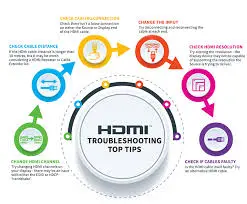
How to Avoid Common HDMI Cable Mistakes
Many people make simple mistakes when buying HDMI cables. Avoid these to save money and improve performance:
Don’t buy based on brand name alone
Some branded cables cost more but offer no real improvement. What matters most is:
- Speed rating
- Build quality
- Certification
You can find affordable, high-quality cables with the same performance as expensive branded ones.
Don’t assume all HDMI cables are the same
Different cables have different bandwidths. A Standard cable cannot deliver 4K HDR, and a Premium cable cannot handle 8K unless it is Ultra High-Speed.
Don’t ignore your device’s requirements
Check your device specifications. For example:
- 4K TV? Choose High-Speed or Premium
- 8K TV? Choose Ultra High-Speed
- Gaming console? Use HDMI 2.1
Matching the cable to the device ensures peak performance.
For multiple cables, buy bulk HDMI cable
If you need several cables for:
- Office setups
- Gaming lounges
- Home theater installations
- Multi-room connections
Buying bulk HDMI cable saves money and gives you consistent quality across all connections.
Final Thoughts
The right HDMI cable is essential for achieving the best performance from your TV, gaming console, projector, or home theater. By understanding the different types of HDMI cables—Standard, High-Speed, Premium High-Speed, and Ultra High-Speed—you can find exactly what fits your device and usage.
Instead of guessing or buying the most expensive option, match your cable choice with:
- Your device’s resolution
- Your refresh rate requirements
- Your cable length
- HDMI version compatibility
- Build quality and certifications
With the correct cable, you’ll enjoy:
- Stable connections
- Sharper picture quality
- Clearer audio
- Smooth gameplay
- Better streaming
- Fewer technical issues
Investing in the right HDMI cable ensures a high-quality entertainment experience that will continue to perform reliably for years.
For more
For more exclusive influencer stories, visit influencergonewild