Smartphone Gimbals: The Ultimate Companion for Stable and Creative Video Recording
In today’s world of mobile videography, smartphone gimbals have become one of the most essential tools for filmmakers, content creators, vloggers, and hobbyists. While modern smartphones can record high-quality videos, even a slight hand movement can ruin a perfectly shot frame.
A smartphone gimbal eliminates these shakes and allows creators to achieve professional-grade cinematic videos without expensive equipment. It is no longer just a stabiliser—it is a creative powerhouse, enabling dynamic shots, tracking movements, smooth pans, and even advanced cinematic effects.
Whether you are shooting travel vlogs, social media content, short films, tutorials, or personal projects, a smartphone gimbal enhances stability, visual appeal, and storytelling potential.
How Smartphone Gimbals Work
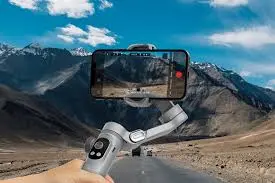
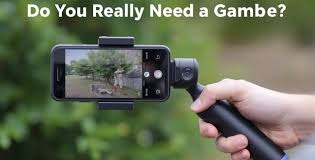
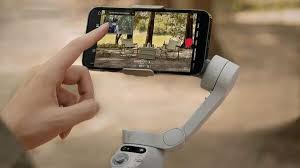
A smartphone gimbal is a motorised stabiliser designed to keep your phone steady during filming. It uses motors, gyroscopes, accelerometers, and sensors to detect motion and counteract shakes.
The Three Axes of Stabilisation
- Pan Axis: Controls horizontal side-to-side movement.
- Tilt Axis: Controls vertical up-and-down movement.
- Roll Axis: Corrects sideways tilt, keeping the horizon level.
By stabilising along all three axes, gimbals ensure that footage is smooth, stable, and visually appealing, even when filming moving subjects or walking shots.
Smart Features in Modern Gimbals
Modern gimbals also include AI-powered features:
- Subject Tracking: Keeps moving objects in focus automatically.
- Gesture Control: Hands-free operation using simple hand gestures.
- Automated Panoramas: Capture smooth 360° sweeping shots.
- Time-lapse and Hyperlapse: Motion-controlled sequences for creative storytelling.
- Face and Object Recognition: Ensures subjects remain centered.
These features allow creators to achieve shots that were previously possible only with expensive professional rigs.
Advantages of Smartphone Gimbals
Professional-Level Stabilisation
The most important advantage of a gimbal is eliminating shaky footage. Whether walking, running, or filming in dynamic environments, gimbals maintain smoothness so creators can focus on composition and creativity.
Enhanced Cinematic Quality
Gimbals allow you to film:
- Fast-moving subjects
- Outdoor adventures
- Crowded or urban scenes
- Low-angle and high-angle shots
Every shot appears polished, cinematic, and professional, enhancing overall video quality.
Creative Freedom
Gimbals are more than stabilisers—they are creative tools. Popular shooting modes include:
- Follow Mode: Tracks subjects for smooth dynamic shots.
- Lock Mode: Maintains a fixed camera orientation.
- Pan/Tilt Mode: Smooth horizontal and vertical camera movements.
- POV Mode: Immersive first-person perspective.
- Sport Mode: Fast-action sequences without shaking.
- Dolly Zoom / Vertigo Effect: Adds cinematic drama to scenes.
These features help filmmakers and content creators experiment with creative angles and storytelling.
Flexibility and Portability
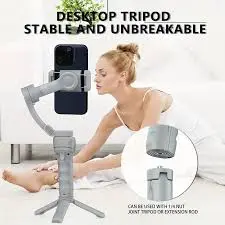
Lightweight and Travel-Friendly
Modern gimbals are compact and lightweight, ideal for:
- Travel filming
- Outdoor adventures
- Event coverage
- On-the-go shooting
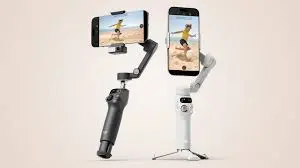
Unlike traditional stabilisers, they are easy to carry, quick to deploy, and versatile.
Multiple Shooting Modes
- Lock Mode: Keeps your phone steady in one position.
- Follow Mode: Tracks subjects dynamically.
- Pan/Tilt Mode: Smooth camera sweeps.
- POV Mode: Captures first-person perspective shots.
- Sport Mode: Handles fast action without shakes.
This ensures creators can film professional-grade footage in any scenario.
Time-Saving and Cost Efficiency
Quick Setup
Gimbals are easy to assemble and ready to use within minutes, saving production time.
Affordable Alternative to Professional Rigs
Compared to traditional stabilisers and rigs, smartphone gimbals are budget-friendly while providing high-quality cinematic results.
Adaptable and Efficient
They can switch modes quickly and adjust to different shooting conditions, improving workflow efficiency.
Advanced Techniques for Cinematic Footage
Smooth Panning and Tilting
- Move the gimbal slowly and steadily for cinematic effect.
- Combine pan and tilt movements for dynamic storytelling.
Tracking Moving Subjects
- Use Follow Mode to keep subjects centered.
- Move laterally or diagonally for depth and perspective.
Creative Angles
- Low-angle shots make subjects look larger or more dramatic.
- High-angle shots show context and scale.
- POV shots immerse viewers in the scene.
Combining Gimbals with Camera Settings
- Slow-motion videos look cinematic when stabilized.
- HDR and night mode enhance footage in various lighting conditions.
- Manual focus allows precise control while gimbal stabilises movement.
Creative Applications
Travel and Adventure Filming
- Capture mountains, beaches, forests, and urban areas
- Maintain stable footage while moving
- Combine with drone shots for epic perspectives
Vlogging and Social Media
- Walking vlogs remain stable
- Instagram Reels, TikTok, and YouTube Shorts look professional
- Perfect for “day in the life” videos
Short Films and Cinematic Storytelling
- Smooth pans, tilts, and tracking shots
- Unique low-angle and high-angle compositions
- Time-lapses and hyperlapses add motion storytelling
Event Coverage
- Weddings, sports, concerts, or corporate events
- Smooth follow shots of moving subjects
- Professional quality without bulky equipment
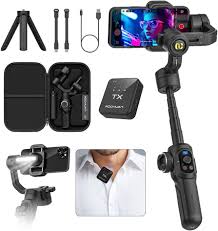
Accessories to Enhance Gimbal Use
Audio Solutions
- External microphones improve audio quality
- Lavalier mics for interviews and vlogs
Lighting Options
- Compact LED lights enhance low-light footage
- Adjustable brightness for cinematic effect
Tripods & Mounts
- Static shots for time-lapses or cinematic sequences
- Flexible mounts for creative angles
Lens Attachments
- Wide-angle lenses for landscapes
- Macro lenses for close-up shots
Power Extensions
- Power banks and spare batteries ensure uninterrupted filming
Troubleshooting and Maintenance
Common Issues
- Jittery footage
- Motors overheating
- Poor battery performance
- Misaligned smartphones
Solutions
- Rebalance your smartphone
- Update gimbal firmware
- Avoid overloading with heavy accessories
- Charge batteries fully before shooting
Pro Tips for Professional Results
- Plan shots and storyboard sequences
- Combine gimbal movements with camera features (HDR, slow-motion)
- Practice smooth walking or tracking movements
- Experiment with creative angles and transitions
- Regularly calibrate the gimbal for optimal performance
- Film multiple takes to select the best footage
- Use motion-controlled time-lapses for cinematic effect
Comparison: Smartphone Gimbals vs Traditional Stabilizers
| Feature | Smartphone Gimbal | Traditional Stabilizer |
|---|---|---|
| Portability | Compact & lightweight | Bulky & heavy |
| Cost | Affordable | Expensive |
| Setup | Quick & easy | Time-consuming |
| Creative Modes | Multiple | Limited |
| Ideal For | Travel, social media, vlogs | Professional cinema |
Smartphone gimbals offer the perfect balance between affordability, portability, and cinematic-quality results.
Pros and Cons
Pros
- Affordable and portable
- Professional stabilization
- Multiple creative modes
- Lightweight and travel-friendly
- Easy to use
Cons
- Limited battery life
- Advanced models can be expensive
- Requires practice for best results
FAQs About Smartphone Gimbals
- Q1: Can I use it for vlogging?
A1: Yes, ideal for walking, talking, or moving shots. - Q2: Do I need a professional camera?
A2: No, smartphones plus gimbals are enough for cinematic results. - Q3: How long does the battery last?
A3: 8–12 hours typically, depending on model and usage. - Q4: Are they travel-friendly?
A4: Yes, compact design makes them ideal for travel. - Q5: Can I film low-light footage?
A5: Yes, but LED lights improve quality. - Q6: Can gimbals handle heavy phones?
A6: Most support up to 300–400g; check specs. - Q7: Can I use it for social media content?
A7: Absolutely—Instagram, TikTok, YouTube, and more.
For more
For more exclusive influencer stories, visit influencergonewild